







A computer that will not power on can feel like a complete loss, especially when it holds work files, school projects, photos, or business records. But can a dead motherboard be repaired? Often, yes. A motherboard failure does not always mean the entire board has to be replaced, and it does not automatically mean your data is gone. The right answer depends on what failed, how the device was damaged, and whether board-level repair makes financial sense.
What “Dead Motherboard” Really Means
The motherboard is the main circuit board inside a laptop, desktop, MacBook, phone, or tablet. It connects the processor, memory, storage, power system, display, ports, and other components. When it develops a fault, the device may appear completely dead even though only one small circuit or component has failed.
Common signs include no power, no charging light, random shutdowns, a black screen with power lights on, USB ports that stop working, repeated boot loops, overheating, or liquid damage symptoms. On laptops, a failed charging circuit can look exactly like a dead motherboard. On desktops, the problem could instead be the power supply, RAM, graphics card, or a loose connection.
That is why a proper diagnosis matters before anyone declares the motherboard beyond repair. Replacing a board based on symptoms alone can be expensive and unnecessary.
Can a Dead Motherboard Be Repaired?
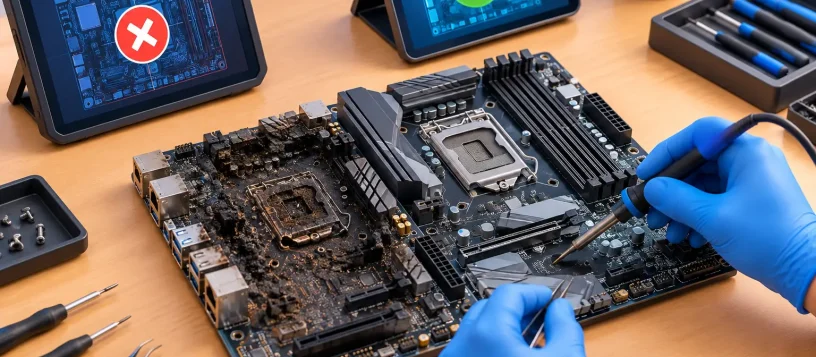
Yes, many motherboard faults can be repaired at the component level. Certified technicians can test power rails, charging circuits, fuses, capacitors, ports, controllers, and other small components that keep a device running. If the fault is isolated and replacement parts are available, a repair may restore the original board without replacing the entire device.
The repair is not always simple. Modern boards are compact, multi-layered, and packed with tiny components. A successful board repair requires specialized tools, accurate diagnostics, and experience reading electrical faults. It is very different from swapping a keyboard, battery, or screen.
A motherboard is more likely to be repairable when the damage is limited to a charging port circuit, blown fuse, damaged capacitor, failed power-management chip, corrupted firmware, broken connector, or localized liquid exposure. These issues can sometimes be corrected without affecting the processor or storage.
Repair becomes less practical when there is severe corrosion across the board, extensive burn damage, a cracked board, damaged internal layers, or failure of an integrated CPU or graphics processor. In those cases, board replacement or device replacement may be the better value.
The Most Common Causes of Motherboard Failure
Liquid damage
Spilled coffee, water, condensation, and moisture can cause corrosion or short circuits. The device may fail immediately, or it may seem fine for days before corrosion spreads. Turning it on repeatedly after a spill can make the damage worse.
If liquid reaches the motherboard, shut the device down, disconnect power, and avoid charging it. Do not rely on rice or a hair dryer. Both can delay proper service and leave contamination on the board. Fast professional cleaning and diagnosis gives the device its best chance of recovery.
Power surges and charging problems
A failing charger, damaged charging port, power surge, or poor-quality replacement adapter can damage the power circuits on a motherboard. This is common with laptops that show no charging light, only work at a certain cable angle, or suddenly stop powering on.
A technician should test the adapter and power input before assuming the motherboard has failed. Sometimes the fix is a charging port or DC jack repair rather than a full board repair.
Heat and age-related wear
Heat slowly affects electronic components. Dust buildup, blocked vents, failed fans, and dried thermal paste can push a computer beyond safe operating temperatures. Over time, heat cycles may weaken solder connections or damage power components.
Older devices can also develop capacitor failures or storage-related boot problems that mimic motherboard failure. Regular cleaning and cooling maintenance can prevent many heat-related issues before they become serious.
Physical damage
A dropped laptop, bent charging port, cracked case, or impact near a USB or HDMI port can damage connectors and circuits on the board. Even when the outside looks fine, internal stress can break a component or solder joint.
Repair or Replace: What Makes Sense?
The best choice is not always the cheapest immediate option. It is the option that gives you reliable use of the device without putting important data, work, or security at risk.
Repair is often worthwhile when the device is relatively new, has strong specifications, contains important data, or would be expensive to replace. It can also make sense for a business workstation that is already configured with specialized software, user settings, and secure access tools.
Replacement may be smarter when repair costs approach the value of the device, the board has broad liquid damage, or the computer is already too slow for current needs. For example, repairing a premium MacBook or a newer business laptop may offer good value. Spending heavily on an aging entry-level laptop with a weak battery, worn keyboard, and outdated hardware may not.
A trustworthy repair shop should explain both options clearly. You should receive an upfront quote and a practical recommendation, not pressure to approve work that does not make sense for your budget.
What Happens During a Motherboard Diagnosis?
A proper diagnosis starts by ruling out simpler faults. The technician checks the charger or power supply, battery, display, memory, storage, ports, and external signs of physical or liquid damage. They then test whether the board is receiving and distributing power correctly.
If the motherboard is the source of the problem, the next step is identifying the failed circuit or component. This may involve checking for shorts, measuring voltage, inspecting corrosion under magnification, and testing chips that control charging, power, display, or startup.
Once the fault is found, the technician can recommend component-level repair, motherboard replacement, or a data recovery plan. The exact turnaround depends on the device, the fault, and parts availability. Some issues can be resolved quickly, while liquid damage and complex board faults need more careful work.
Your Data May Still Be Recoverable
A dead motherboard does not necessarily mean lost files. In many computers, the data remains on the SSD or hard drive even when the board will not start. A technician may be able to remove the drive, access the files from another system, or recover data before repair decisions are made.
There are exceptions. Some newer laptops and Apple devices use soldered storage or encryption tied to the original motherboard. In these cases, repairing the original board can be especially valuable because it may be the only path to accessing the data.
For small businesses, this is a reminder to maintain verified backups. A backup protects you from hardware failures, ransomware, accidental deletion, and theft. It also gives you more freedom to decide whether repairing an older device is worth it.
Avoid These Risks Before Bringing It In
If a device has stopped working, avoid taking it apart unless you have the right tools and experience. Loose screws, damaged connectors, and incorrect chargers can create a larger problem. Do not keep attempting to power on a liquid-damaged device, either.
It is also wise to avoid low-cost, unverified chargers and batteries. They may fit the device but deliver unstable power or poor charging performance. Quality parts and correct testing matter, particularly when the motherboard is already vulnerable.
For Vaughan, Woodbridge, Maple, Kleinburg, and Nobleton customers, Vaughan Computers provides practical motherboard diagnostics with a focus on clear answers, fair quotes, and no-fix-no-fee service. Whether the issue is a laptop that will not charge, a desktop that will not boot, or a device affected by liquid, the goal is to identify the real fault before recommending a repair.
A device that looks dead may need a replacement board, but it may also need one repairable component and careful attention. Getting a professional diagnosis early can protect your budget, preserve your data, and get you back to the work and connections that cannot wait.