







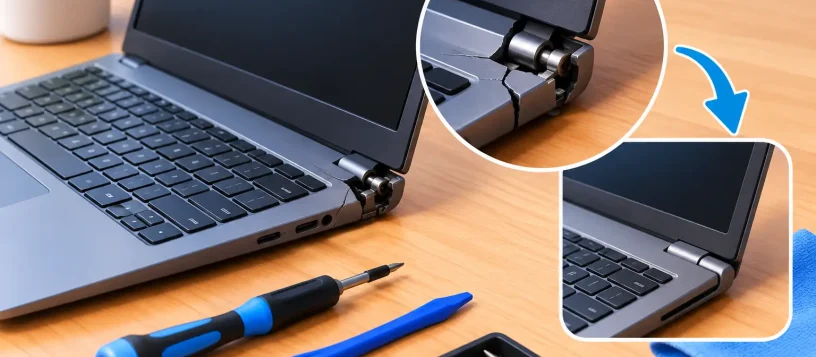
A laptop hinge rarely cracks without warning. You may first notice a popping sound, a screen that feels stiff when opening, or plastic separating near the corner of the display. If you are searching for how to fix cracked laptop hinge damage, the most important first step is to stop forcing the lid. Continuing to open and close it can turn a repairable hinge mount into a broken screen, torn display cable, or damaged laptop casing.
A cracked hinge is not always a simple cosmetic issue. The metal hinge itself may be intact while the plastic mounting points inside the base or display cover have failed. Finding out which part is damaged helps determine whether a careful temporary fix is reasonable or whether the laptop needs professional repair.
What a Cracked Laptop Hinge Usually Means
Laptop hinges are designed to hold the display at a stable viewing angle while allowing the lid to open thousands of times. They are secured to small brackets or threaded inserts inside the lower case and display assembly. Over time, a tight hinge, a dropped laptop, or weakened plastic can cause those anchor points to crack or pull loose.
Common symptoms include a lid that lifts the keyboard deck when opened, a visible gap around the hinge cover, clicking or grinding noises, a screen that will not stay in position, or a bezel that starts separating from the display. On some models, the hinge can place pressure directly on the screen panel or the thin video cable running through the hinge area.
The risk is higher on laptops with plastic shells, but metal-bodied laptops and MacBooks can also develop hinge-related damage after impact or repeated stress. A cracked corner on the exterior does not reveal the full condition inside, which is why opening the unit without the right tools can create additional problems.
How to Fix Cracked Laptop Hinge Damage Safely
The right repair depends on where the crack is located. If the outer hinge cover is loose but the screen moves normally and there is no resistance, the issue may be limited to a cosmetic cover or a few missing screws. If the display frame separates, the base flexes, or the lid requires extra force to move, treat it as an internal hinge mount failure.
Before attempting anything, power the laptop off completely and disconnect the charger. Do not keep using a machine with a severely loose hinge on your lap, because the display can shift suddenly and damage the screen. If the battery is removable, remove it. For internal-battery laptops, avoid metal tools near the battery connection unless you know how to disconnect it safely.
A basic inspection can be done without disassembly. Set the laptop on a stable table, then gently move the lid a small amount from both corners. Watch for uneven movement, lifting plastic, or a gap that opens wider near one hinge. Never twist the screen or pull a hinge cover into place. Those actions may crack the LCD panel.
If the hinge moves freely and only a visible cover has come loose, it may be possible to reattach the cover after confirming that all original screws are present and undamaged. Use only the correct screw size. A screw that is too long can puncture internal components, while a screw that is too short will not hold the assembly securely.
For cracks in the mounting posts, lower case, or display back cover, a proper repair often involves disassembling the laptop, removing the screen assembly, and replacing the affected housing or bracket. In some cases, a technician can reinforce the broken mounting area with a purpose-made repair method. In others, replacement of the base cover, display cover, or hinge pair is the more durable choice.
Why Glue Is Usually a Short-Term Fix
It is tempting to apply super glue or epoxy to a cracked laptop hinge mount. While an adhesive can sometimes hold a non-moving cosmetic piece, it is rarely a lasting solution for the hinge itself. Hinges operate under constant torque every time the laptop opens, and the original mounting points need to withstand that repeated force.
Glue can also spread into screw holes, cables, vents, or the display assembly. Once hardened, it may make a future repair more difficult and more expensive. Super glue is particularly risky around plastic because it can leave a white residue and become brittle over time.
If you need to transport the laptop before repair, keep the lid closed and carry it flat in a padded bag. If the hinge is unstable, avoid opening and closing it repeatedly. Using an external monitor, keyboard, and mouse may help you access important files while keeping lid movement to a minimum, but only if the laptop can sit safely in one position.
When a DIY Hinge Repair Makes Sense
A do-it-yourself repair can make sense when you have experience opening electronics, can obtain the exact replacement parts, and the damage is limited to a replaceable hinge cover, screw, or outer case. You will typically need a precision screwdriver set, plastic opening tools, organized screw storage, and model-specific instructions.
The trade-off is time and risk. Modern laptops are compact, and screws can vary by only a few millimeters. The display cable, Wi-Fi antenna wires, webcam cable, and battery may all be near the repair area. A rushed repair can result in a black screen, poor Wi-Fi signal, stripped screws, or a laptop that no longer closes correctly.
DIY repair is usually not the best option if the screen flickers when the lid moves, the display has lines or dark spots, the hinge is very stiff, the base is splitting apart, or the laptop is still under warranty. These signs suggest that the damage may extend beyond the exterior plastic.
Professional Repair Protects the Parts Around the Hinge
A professional hinge repair begins with diagnosis, not guesswork. The technician checks whether the hinge tension is correct, whether the mounting points are cracked, and whether the screen cable or display panel has been affected. Both hinges are often inspected because one overly tight hinge can overload the opposite side.
The repair may involve replacing a damaged hinge, a lower case, a display back cover, or broken mounting hardware. The best option depends on the laptop model, available parts, and the condition of the surrounding plastics. A trustworthy repair shop should explain what failed, what parts are needed, and whether a repair is more cost-effective than replacement.
For local customers dealing with a work laptop, school device, or family computer, Vaughan Computers can assess hinge damage and provide an upfront repair recommendation. Fast, reliable service matters when a broken hinge threatens the screen or interrupts access to the files and programs you use every day.
How to Prevent Another Hinge Crack
After repair, open the laptop from the center of the lid rather than one corner. Opening from one side twists the display and puts uneven pressure on the hinges. Use two hands if the laptop has a large or heavy screen, and never force the lid if it begins to feel unusually tight.
Keep the laptop in a padded sleeve when traveling, especially if it rides in a backpack with books or other heavy items. Do not carry it by the screen, and avoid placing objects on top of it when closed. Dust and debris around the hinge area should be cleaned gently rather than pushed into the gap.
A hinge repair is most affordable when handled before the screen, cable, and case sustain further damage. If your laptop is making noise, separating near the hinge, or resisting when you open it, stop forcing the lid and have the problem checked while the repair is still straightforward.