







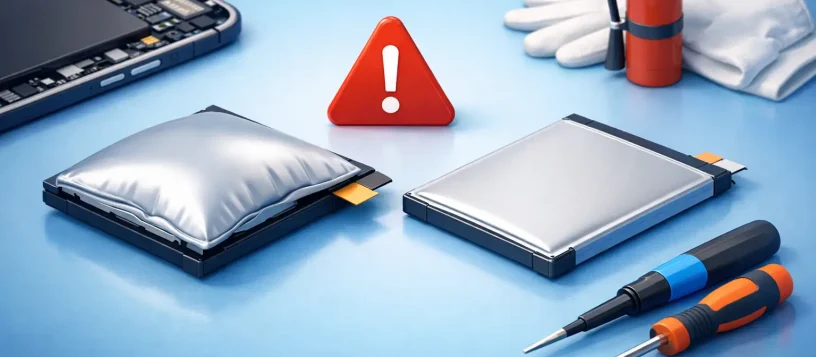
A phone screen lifting away from its frame, a laptop trackpad that suddenly feels tight, or a tablet case that no longer sits flat is not just a cosmetic problem. It can be a swollen battery. Knowing when to replace swollen batteries can protect your device, your data, and your home or workplace from a potentially unsafe failure.
Lithium-ion batteries power nearly every modern phone, laptop, tablet, and wearable device. They are efficient and compact, but they wear out over time. When a battery begins to swell, gases can build up inside its sealed cell and push against the device from the inside. That pressure can damage screens, keyboards, trackpads, cables, and the device enclosure long before the battery stops working completely.
When to Replace Swollen Batteries
The answer is simple: replace a swollen battery as soon as you notice it. A battery that has visibly expanded is no longer safe to keep using, charging, storing, or carrying around. Do not wait until the device will not turn on, and do not assume the swelling will settle down on its own.
In many cases, people first notice a screen separating from an iPhone or Samsung phone frame. On a laptop, the bottom cover may bulge, the keyboard may rise, or the trackpad may stop clicking normally because the battery is pressing against it. An iPad or tablet may rock on a table rather than lie flat. These are clear signs that the battery needs professional attention.
A device can still hold a charge while the battery is swollen. That does not make it safe. The battery’s ability to power the device and its physical condition are two different things. Once the cell has expanded, continued charging can increase the risk of leakage, overheating, or further internal damage.
Signs Your Battery May Be Swelling
Visible bulging is the most obvious warning sign, but it is not the only one. Pay attention if your device suddenly feels different in your hand or no longer closes, sits, or operates as it should.
A swollen battery may cause the back cover of a phone to separate, create a gap around the screen, or make buttons feel misaligned. On a laptop, the lid may not close evenly, the chassis may appear curved, or the trackpad may become difficult to press. You may also notice unusual heat, rapid battery drain, unexpected shutdowns, or a charging pattern that has become inconsistent.
Heat and poor battery life alone do not always mean the battery is swelling. Software problems, heavy app usage, failing chargers, and aging devices can cause similar symptoms. But physical distortion is different. If any part of the device is being pushed outward, treat it as a battery safety issue until a technician confirms otherwise.
What to Do Right Away
If you suspect a swollen battery, stop charging the device. Unplug it from power and turn it off if you can do so normally without forcing any buttons or opening the case. Place it on a hard, nonflammable surface away from paper, fabric, direct sunlight, and heat sources.
Do not press down on a lifted screen or bulging cover to make it fit again. Pressure can puncture a damaged lithium-ion cell. Do not put the device in a drawer, under a pillow, in a hot vehicle, or in the freezer. Extreme temperatures do not fix battery swelling and can make the situation worse.
Avoid using the device until it has been inspected. It may be tempting to keep using a laptop for work or a phone for calls, especially when it still turns on. However, every charging cycle and every period of heat adds stress to a battery that has already failed physically.
If the device is hot, smoking, hissing, leaking, or giving off a sharp chemical smell, move away from it and keep others clear of the area. Do not handle a leaking or actively overheating device more than necessary. Contact local emergency services if there is an immediate fire risk.
Why Batteries Swell
Most swollen batteries are the result of normal chemical aging combined with heat, charging habits, or physical stress. Lithium-ion batteries gradually lose capacity over hundreds of charge cycles. As internal components degrade, gas can form in the cell. Because the battery is sealed, that gas has nowhere to go except outward.
Heat is a major contributor. Devices left in vehicles, used heavily while charging, exposed to direct sun, or operated in poorly ventilated areas can age faster. Cheap or damaged charging accessories can also create charging problems, although a quality charger does not make an old battery last forever.
Physical damage matters too. A phone dropped hard or a laptop with liquid damage may have a compromised battery even if the issue does not appear immediately. Manufacturing defects are less common, but they can occur. That is why a professional inspection is useful: the repair should address the battery and check whether swelling has damaged nearby parts.
Is Battery Replacement Always Worth It?
Often, yes. If a phone, tablet, or laptop otherwise meets your needs, replacing the battery can restore safe daily use at a much lower cost than replacing the whole device. It can also prevent a swollen cell from turning a straightforward battery repair into a screen, keyboard, trackpad, or motherboard repair.
The decision depends on the device’s age, condition, and repair needs. A newer iPhone with a lifting screen is usually a strong candidate for battery replacement. A laptop that still performs well for school, work, or home use may gain several more useful years with a new battery. For an older device with extensive damage, slow performance, or multiple failing components, it may make more sense to compare repair costs with replacement options.
Data is another consideration. Even when a device is being replaced, it may need to be powered on long enough for data transfer or backup. A swollen battery should not be repeatedly charged just to retrieve files. A technician can assess the safest approach and help protect important photos, documents, and business information.
Why Professional Battery Service Is the Safer Choice
Modern devices are tightly assembled. Batteries may be secured with strong adhesive, placed near delicate display cables, or connected beside sensitive internal components. Removing one incorrectly can damage the device or puncture the cell.
Professional repair includes more than swapping a part. A proper service checks for pressure damage, inspects charging connections, confirms the replacement battery is functioning correctly, and makes sure the device closes properly afterward. This is especially valuable when swelling has already lifted a screen or distorted a laptop case.
Vaughan Computers can inspect swollen phones, tablets, and laptops, explain the condition clearly, and provide an upfront repair option before work begins. For customers who depend on their devices for work, school, family communication, or small business operations, fast diagnosis helps reduce downtime without guessing at the cause.
Can You Prevent Future Battery Swelling?
No battery lasts forever, but a few habits can reduce heat and unnecessary stress. Use reliable charging accessories, keep devices out of extreme temperatures, and avoid leaving a device plugged in under bedding, cushions, or other materials that trap heat. If a charger, cable, or charging port becomes unusually hot, stop using it until it has been checked.
You do not need to obsess over every percentage point of battery charge. Modern devices have charging management features, and normal daily charging is expected. The more practical goal is to avoid persistent heat, physical damage, and continued use after obvious battery warning signs appear.
Do not throw a swollen battery or device into household garbage or standard recycling bins. Damaged lithium-ion batteries require proper handling and disposal through an approved electronics or hazardous-waste program. A repair professional can advise on the correct next step if the device is not worth repairing.
A lifted screen or bulging case is your device asking for attention, not a problem to tape shut or charge through. Turn it off, keep it away from heat, and arrange a professional battery inspection promptly. Acting early can be the difference between a simple repair and losing a device you rely on every day.